

Paint
Output: Standard Output (stdout)
Memory limit: 256 megabytes
Time limit: 2.5 seconds
Alvin is an aspiring artist who decided to make an artistic masterpiece in NS Paint (NZIC Software Paint). The canvas has a height of N pixels and a width of M pixels. A pixel in row x and column y is denoted as (x, y). Initially, the canvas contains a seemingly random assortment of pixels: pixel (i, j) has a colour c_{i,j} represented by a single integer in the range 1 to 10^6 inclusive.
Alvin has decided that he will try to clear the canvas using the paint bucket tool. When applied to a given pixel position, the paint bucket tool will change the colour of the selected pixel and all pixels with the same colour that are connected to this pixel (either directly or indirectly via a sequence of pixels with the same colour) to a new colour that the user has selected. Two pixels are considered adjacent if they are in the same row and are exactly one column apart, or if they are in the same column and are exactly one row apart.
Alvin will apply the paint bucket tool to the pixel at position (R, C) a total of K times. On the i-th use of the paint bucket tool he will apply it with colour v_i. To gauge his progress at making the canvas have one colour, Alvin wants to know the total number of pixels that have the same colour as (R, C) and are connected to (R, C) after each use of the paint bucket tool.
Alvin is of course busy furious clicking with the paint bucket tool, so he has asked for your help to write a program to calculate this for him.
Input
The first line of input contains five space separated integers N, M, K, R, and C.
The following N lines each contains M space separated integers which are the initial colours of the pixels.
The following K lines each contain a single integer v_i: the colour of the i-th application of the paint bucket tool.
Output
On the first line output a single integer, the area initially connected to pixel (R, C).
On the following K lines output a single integer, the area connected to pixel (R, C) after the i-th operation.
Constraints
- 1 \le N \le 2,500
- 1 \le M and N \times M \le 100,000
- 0 \le K \le 100,000
- 0 \le R \le N - 1
- 0 \le C \le M - 1
- 1 \le c_{i,j} \le 10^6 for all 0 \le i \le N - 1 and 0 \le j \le M - 1.
- 1 \le v_i \le 10^6 for all 0 \le i \le K - 1
Subtasks
- Subtask 1 (+22%): N = 1, that is, the canvas consists of a single row of pixels.
- Subtask 2 (+20%): K = 0, that is, Alvin will use the paint bucket tool zero times.
- Subtask 3 (+19%): N, M, K \le 100
- Subtask 4 (+14%): c_{i,j} \le 10 and v_i \le 10, that is, all colours will be between 1 and 10 inclusive.
- Subtask 5 (+25%): No further constraints.
Notes
If you are using Python and your solution is exceeding the time limit, try selecting Python 3.11 (PyPy 7.3.19) when submitting as this will generally make your code run faster. Although beware that your code may run slower with PyPy if you are using recursion.
Sample Explanations
Sample 1
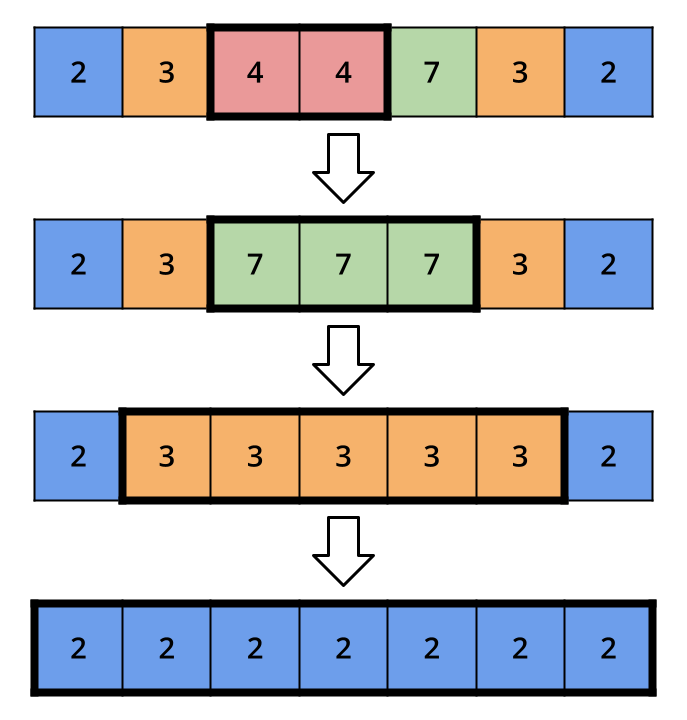
In this sample the canvas consists of N = 1 rows and M = 7 columns. Alvin will apply the paint bucket tool K = 3 times to cell (0, 3). The image below shows the initial state of the canvas, and the state of the canvas after each application of the paint bucket tool. The bold outlined region shows all the cells connected to cell (0, 3) after each application of the paint bucket tool.
Sample 2
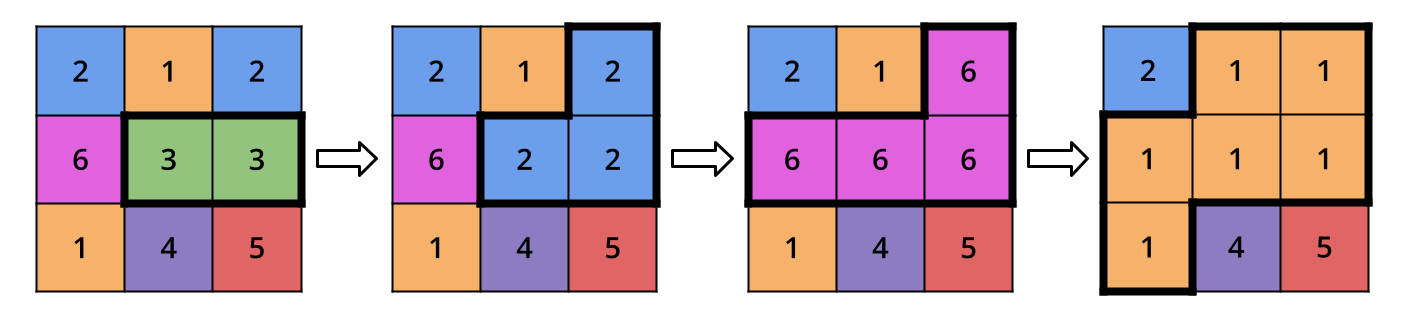
In this sample the canvas consists of N = 3 rows and M = 3 columns. Alvin will apply the paint bucket tool K = 3 times to cell (1, 1). The image below shows the initial state of the canvas, and the state of the canvas after each application of the paint bucket tool. The bold outlined region shows all the cells connected to cell (1, 1) after each application of the paint bucket tool.
-
Sample Input 1
1 7 3 0 3
2 3 4 4 7 3 2
7
3
2
Sample Output 1
2
3
5
7
-
Sample Input 2
3 3 3 1 1
2 1 2
6 3 3
1 4 5
2
6
1
Sample Output 2
2
3
4
6